Problem One
File handoffs slow teams down.
Many teams still rely on AutoCAD for design, drafting, revision, and review. But once multiple people are involved, collaboration often falls back to a familiar process: send a file, share a screenshot, add markups, meet to confirm the change, and let someone merge the feedback back into the drawing.
That process works, but it naturally creates delay. Every file handoff can introduce version differences. Every screenshot or markup captures only a partial state at a moment in time. Every review meeting forces the team to ask again: which drawing is the current source of truth?
The real problem is not that AutoCAD is missing one more command. The problem is that teams lack a real-time, continuously updated drawing context with server-managed authority.
When collaboration happens through file copies, screenshots, and verbal confirmation, drawing state can drift. It drifts between people, and the team’s understanding of the current state can drift with it.
Problem Two
AI agents need live context.
Another gap is becoming more important: AI agents are entering more software workflows, but desktop CAD tools such as AutoCAD still make it difficult for an agent to become a real collaboration participant.
Many AI capabilities in industrial software today still behave more like an assistant: a user makes a request, and AI returns a result; a user provides context, and AI performs a single pass of processing. This pattern is useful, but it usually sits beside the shared AutoCAD context.
Agents require something different. An agent is not just there to answer questions. It needs to participate in tasks over time, reason over a changing environment, trigger operations, wait for feedback, revise its plan, and form a collaboration loop with human participants.
If an agent only sees a file snapshot, a short written description, or the local state of one user, it cannot reliably participate in AutoCAD collaboration. The problem is not necessarily that the model is weak. The problem is that the agent has not entered the context where the team is working.
What Is Arcora?
Arcora creates a shared AutoCAD workspace.
Arcora for AutoCAD is a real-time collaboration layer for AutoCAD.
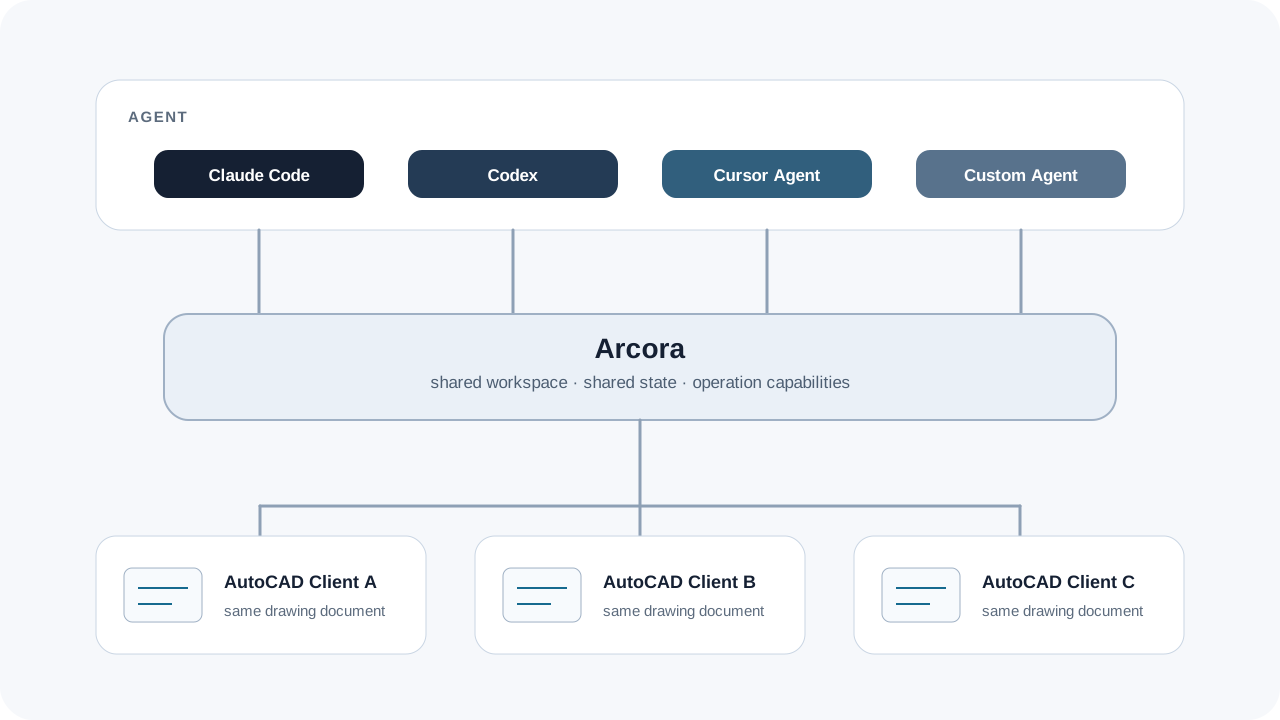
It turns an AutoCAD drawing from a local desktop file into a shared AutoCAD workspace that multiple participants can join. Multiple AutoCAD clients can work around the same drawing context, drawing changes stay synchronized through live updates, and the server maintains server-managed shared state as the authoritative coordination point.
In other words, Arcora solves two context problems in AutoCAD collaboration. Teams are no longer just exchanging files; they are working in the same shared workspace. Agents are no longer limited to static input; they can join the same shared context.
This is also what makes Arcora different from one more AI feature. Arcora is not an AI product tied to a model. It provides the collaboration context that people and agents need before agentic workflows can work inside AutoCAD.
What Arcora Solves
Arcora syncs edits and agent actions.
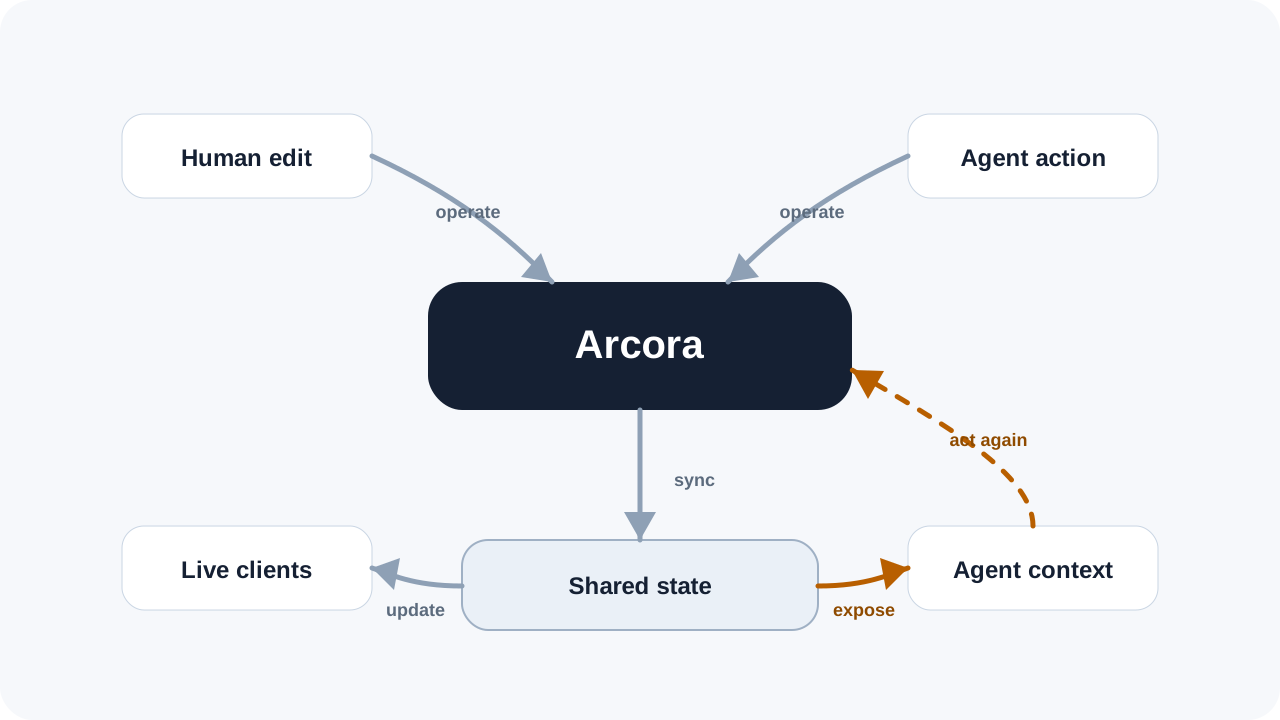
Arcora is not just syncing the screen. It provides an operation loop inside the AutoCAD workflow: human edits and agent actions enter Arcora; Arcora receives, orders, synchronizes, and routes operations; shared state updates then flow back to live AutoCAD clients and agent context.
This layer may sound foundational, but it determines whether collaboration can work. Without shared state, real-time sync is only a visual effect. Without server-managed authority, multi-client editing can drift.
Without controlled operation access, agents remain outside the workflow, limited to analysis and suggestions.
Agent-Agnostic
Use the agent that fits your team.
For agents to enter AutoCAD, they need more than shared context. They also need open access.
Different teams may use agents they develop themselves, or specialized models with substantial domain knowledge. As general-purpose models and agent frameworks evolve quickly, users should be able to choose the most capable and most suitable agent for their own workflow.
Arcora remains agent-agnostic: it does not provide or prescribe a particular agent, bind users to a model, or restrict how teams design prompts or task workflows. Arcora provides context, workspace access, and operation capabilities so different agents can work inside the same AutoCAD collaboration environment.
Who Should Try It
For teams working together in AutoCAD.
If your team still works primarily in AutoCAD and often needs multiple people to discuss, revise, and confirm the same drawing, Arcora is worth evaluating.
What slows collaboration down is often not a single missing command. It is the inability to keep drawing state aligned in real time. File handoff, screenshots, markups, and meetings can all help communication, but they cannot replace a shared AutoCAD workspace.
If you are evaluating how AI should enter your design process, the first question should be more basic: should AI remain an external assistant that answers questions, or should it become a collaborator inside the shared context?
For teams that want to bring AI agents into real AutoCAD workflows, this is more fundamental than adding another AI entry point.
Reference Reads